Over the last few days, I worked on setting up the deployment and automation for my personal portfolio website. The frontend itself was intentionally not the focus. I reused an open-source template so I could spend my time understanding how real deployments work once code leaves local development. Having rebuilt my portfolio multiple times before, I wanted to shift my attention toward infrastructure and automation.
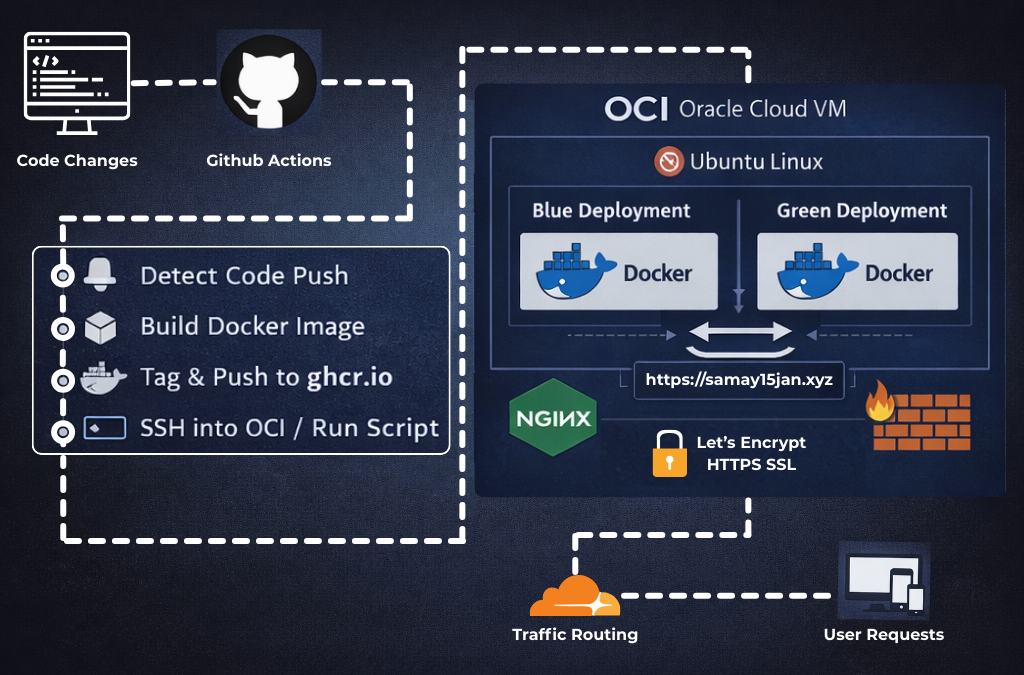
The site is live at https://samay15jan.com, but what mattered to me was everything happening behind it.
My goal was to build a system where pushing code to GitHub would automatically update the live server without manual intervention and without downtime. This required understanding how CI/CD, containerization, traffic routing, and server security work together in practice.
At a high level, the workflow begins with a push to GitHub. This triggers a GitHub Actions pipeline that builds a container image and publishes it to GitHub Container Registry. The pipeline then connects to my Oracle Cloud virtual machine over SSH and executes a deployment script directly on the server.
Instead of stopping the running version and starting a new one, I implemented a blue–green deployment strategy. Two environments exist on the server, but only one receives traffic at any time. The new version is deployed to the inactive environment, health checks are performed, and traffic is switched only after verification. If anything fails, the previous version continues running without interruption.
The blue–green deployment script can be found here:
https://gist.github.com/samay15jan/296498459d1607226b8a59d4ae7b3385
NGINX sits in front of the containers and handles all incoming requests. It also manages HTTPS using Let’s Encrypt and routes traffic to the currently active environment. From the user’s perspective, deployments are invisible and the site remains online throughout the process.
The server runs on Oracle Cloud Infrastructure using Ubuntu Linux. I chose OCI because it provides a free-tier instance that is ideal for students experimenting with real infrastructure. Firewall rules are managed using UFW, allowing only required ports. This part was especially valuable to me, as self-hosting exposes details that managed platforms often abstract away…and those details are where most meaningful learning happens.
Later, I purchased a custom domain through Cloudflare and connected it to NGINX. Cloudflare is used for DNS management, while HTTPS is handled through Let’s Encrypt on the server.
This project taught me that deployment is not just a final step. I gained a practical understanding of blue–green deployment and why running NGINX directly on the host instead of inside application containers and helps reduce downtime. Since containers are disposable by nature, keeping the reverse proxy external allows deployments to occur without affecting traffic.
This project was not about building a portfolio page. It was about understanding how software actually reaches users and how that process can be automated safely.
Going forward, I plan to automate my blogging workflow and gradually move all personal projects under a single self-hosted system. My long-term goal is to run services on demand using containerized workloads (Just like Render have), with a strong focus on performance, reliability, and maintainability.
I also plan to explore Kubernetes to manage container health and long-running services more effectively. Working with Oracle Cloud Infrastructure opened up many new ideas for me, and it has significantly shaped how I think about building and operating systems in the future.
The source code is available at:
https://github.com/samay15jan/portfolio
The live deployment is running at:
https://samay15jan.com